Step 1: I have decided to create my advert in Microsoft PowerPoint. For the simple that I am familiar with its tools and because many others are creating the advert in PhotoShop (which I do not know how to use) and wanting to use something different. Once PowerPoint was open I changed the page orientation from landscape to portrait and changed the background.


Step 2: Once I had taken all the images for my advert I saved them as a .jpg i a folder called Digi Pak Mag Ad Pics

Step 3:After selecting image I wanted to use I copy and pasted it into Paint.

Step 4: Using Paint I was able to edit the images the way I liked. In doing so I cut each member out of the full picture using the Select tool. In doing so each member appear on their own.

Step 5: Once the images were edited to my satisfaction I copy and pasted them into PowerPoint.

As you can see I have been able to edit the images so that the original background no-longer exists and non there is a transparent background. The images have also been PLACED into a square frame in order to make it easy to manipulate.
Step 6:
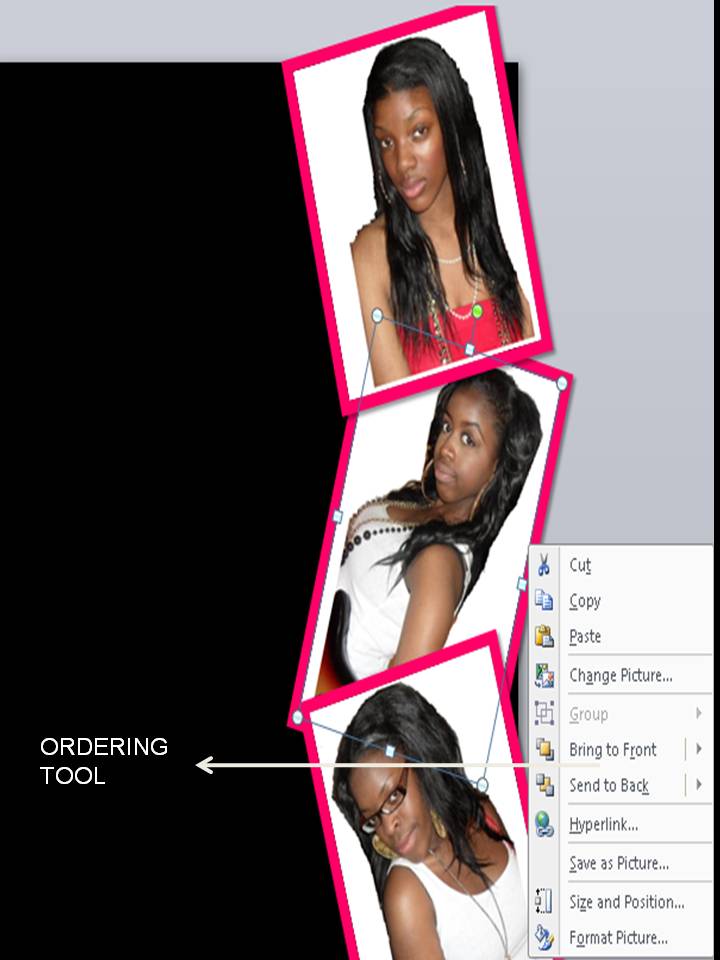
I have now placed a 1.5 (width) pink border around each image to make in stand out. I have also placed the images in right alignment and using the Ordering Tool (Send To Back/Bring To Front) I have been able to overlap the images.
Step 7: I then looked at different font types that I would like to used for the poster. In doing so I used Word Art and typed the same text several times in differnt fonts.

Step 8: I then started to input all the relevant information in order to create a Magazine Advert. This included release formats, dates, quotes extra. In addition I made sure that a music company logo was added to the advert to make it professional. I made the advert more attractive by making sure the elements above were in differnt alignments.


